Getting Started with OpenStack: The Ultimate Beginner's Guide
Cloud computing has redefined how organizations build, deploy, and manage their IT systems. From startups to global enterprises, one name consistently stands out — OpenStack.
OpenStack is more than a platform; it's an open-source movement that brings the power of scalable, flexible, and self-managed cloud infrastructure to everyone. With VM2Cloud, you can harness OpenStack's full potential without the traditional complexity — deploying your own private cloud in hours instead of weeks.
This guide explains the architecture, workflow, and best practices for adopting OpenStack through the VM2Cloud platform — for faster, simpler, and more efficient deployment.
What is OpenStack?
OpenStack is an open-source cloud operating system that controls compute, storage, and networking resources. It provides enterprises with the flexibility to build private or hybrid clouds while maintaining full control over data and infrastructure.
VM2Cloud integrates and optimizes OpenStack's modular architecture — enabling clients to deploy enterprise-grade OpenStack clusters with minimal effort using automation, built-in scaling logic, and preconfigured best practices.
Core Components of OpenStack
OpenStack is built on several interoperable services:
- • Keystone – Identity management for authentication and API access.
- • Nova – Compute management, orchestrating virtual machine instances.
- • Neutron – Network management, routing, and IP assignments.
- • Cinder – Persistent block storage for VM workloads.
- • Glance – Image repository for operating system templates.
- • Swift – Object storage for scalable unstructured data.
- • Horizon – Web dashboard for unified control and monitoring.
VM2Cloud leverages these services through an optimized OpenStack distribution — containerized, high-availability enabled, and fully automated.
OpenStack's modular framework allows you to identify and deploy components depending on your needs. The following OpenStack map gives you a high level overview of the OpenStack landscape to see where those services fit and how they can work together.
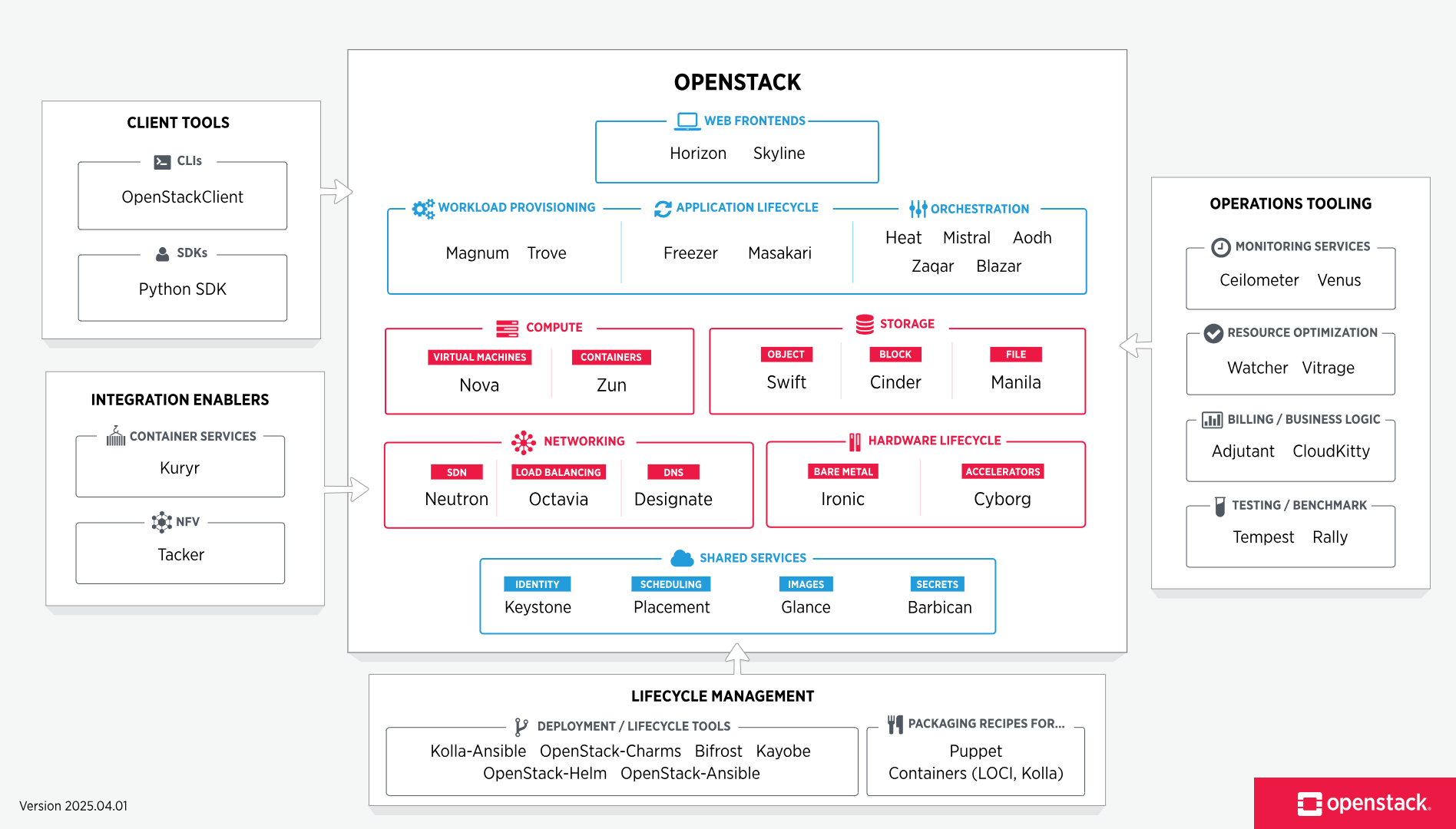
VM2Cloud Architecture and Deployment
The VM2Cloud deployment model simplifies OpenStack installation through an orchestrated automation layer. Using declarative blueprints, clients can roll out multi-node OpenStack environments in minutes.
Logical Architecture
To design, deploy, and configure OpenStack, administrators must understand the logical architecture.
As shown in Conceptual architecture, OpenStack consists of several independent parts, named the OpenStack services. All services authenticate through a common Identity service. Individual services interact with each other through public APIs, except where privileged administrator commands are necessary.
Internally, OpenStack services are composed of several processes. All services have at least one API process, which listens for API requests, preprocesses them and passes them on to other parts of the service. With the exception of the Identity service, the actual work is done by distinct processes.
For communication between the processes of one service, an AMQP message broker is used. The service's state is stored in a database. When deploying and configuring your OpenStack cloud, you can choose among several message broker and database solutions, such as RabbitMQ, MySQL, MariaDB, and SQLite.
Users can access OpenStack via the web-based user interface implemented by the Horizon Dashboard, via command-line clients and by issuing API requests through tools like browser plug-ins or curl. For applications, several SDKs are available. Ultimately, all these access methods issue REST API calls to the various OpenStack services.
The following diagram shows the most common, but not the only possible, architecture for an OpenStack cloud:
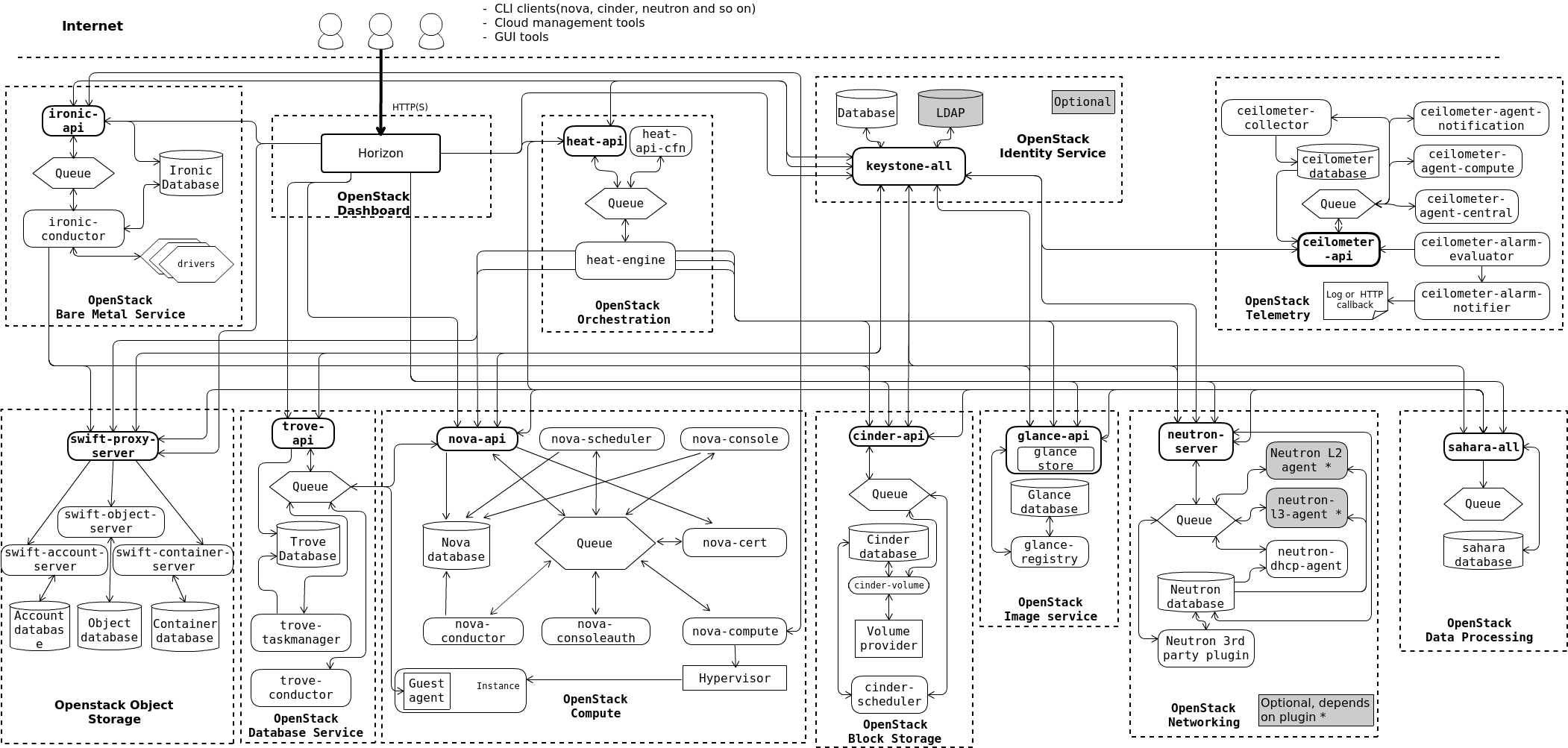
Typical Architecture Includes
This section gives you a breakdown of the different nodes that make up the OpenStack environment. A node is a physical machine that is provisioned with an operating system, and running a defined software stack on top of it.
Controller Node
Controller nodes are responsible for running the management software services needed for the OpenStack environment to function. These nodes:
- • Provide the front door that people access as well as the API services that all other components in the environment talk to.
- • Run a number of services in a highly available fashion, utilizing Pacemaker and HAProxy to provide a virtual IP and load-balancing functions so all controller nodes are being used.
- • Supply highly available "infrastructure" services, such as MySQL and Qpid, that underpin all the services.
- • Provide what is known as "persistent storage" through services run on the host as well. This persistent storage is backed onto the storage nodes for reliability.
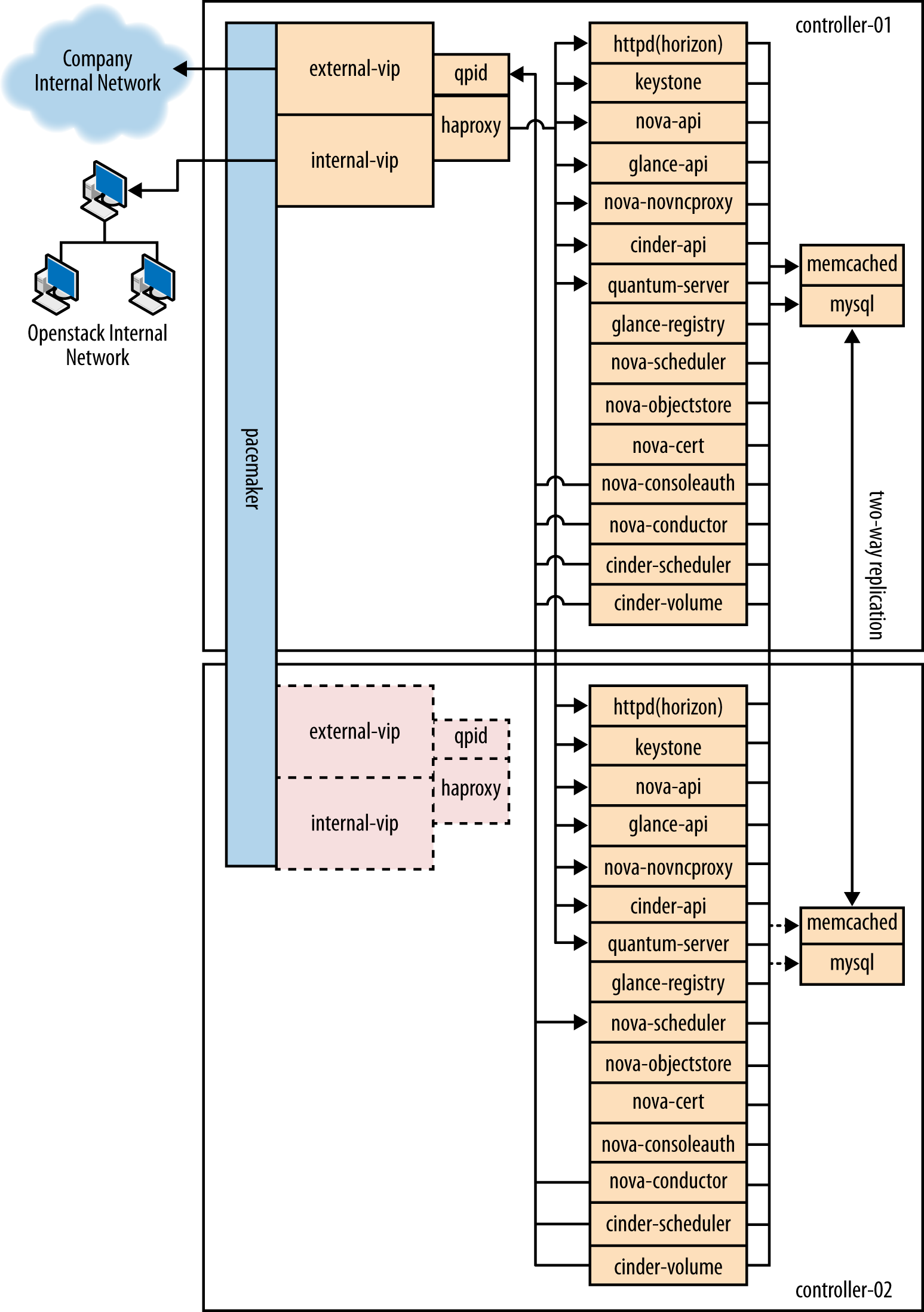
Example Hardware
Model: Dell R620
CPU: 2 x Intel® Xeon® CPU E5-2620 0 @ 2.00 GHz
Memory: 32 GB
Disk: 2 x 300 GB 10000 RPM SAS Disks
Network: 2 x 10G network ports
Compute Node
Compute nodes run the virtual machine instances in OpenStack. They:
- • Run the bare minimum of services needed to facilitate these instances.
- • Use local storage on the node for the virtual machines so that no VM migration or instance recovery at node failure is possible.
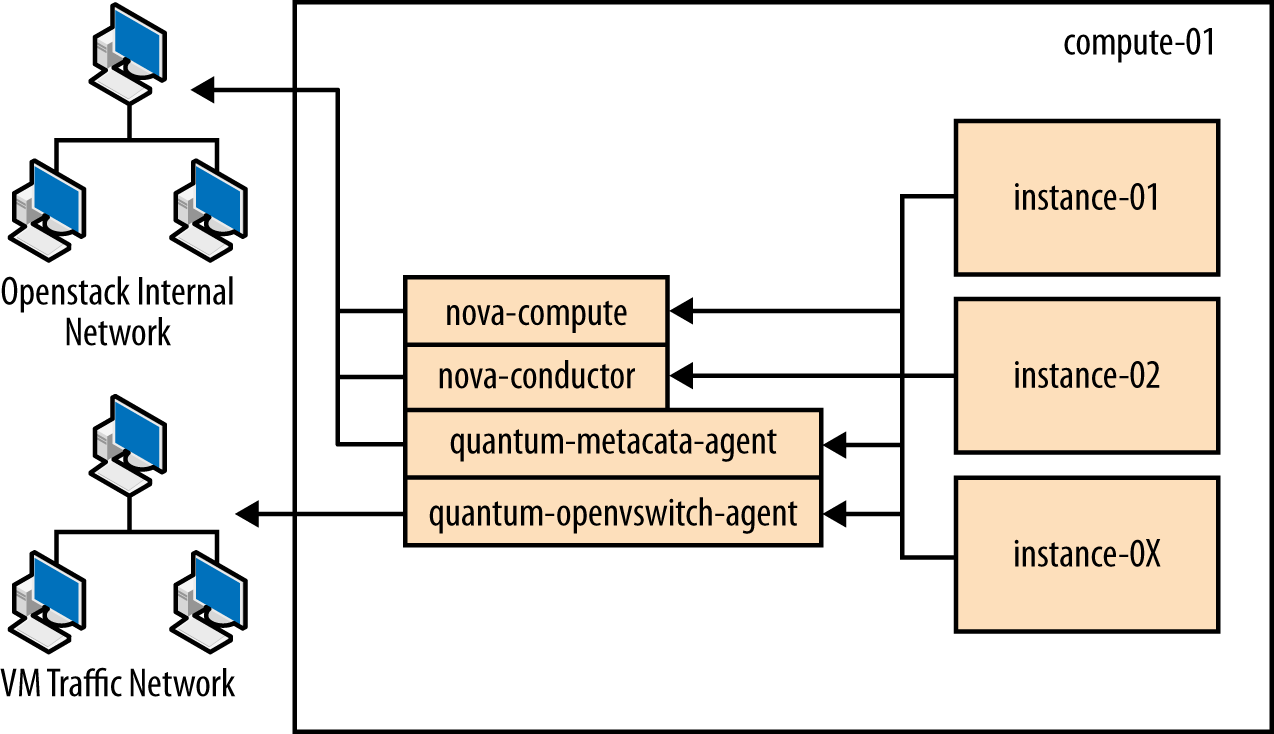
Example Hardware
Model: Dell R620
CPU: 2x Intel® Xeon® CPU E5-2650 0 @ 2.00 GHz
Memory: 128 GB
Disk: 2 x 600 GB 10000 RPM SAS Disks
Network: 4 x 10G network ports (For future proofing expansion)
Storage Node
Storage nodes store all the data required for the environment, including disk images in the Image Service library, and the persistent storage volumes created by the Block Storage service. Storage nodes use GlusterFS technology to keep the data highly available and scalable.
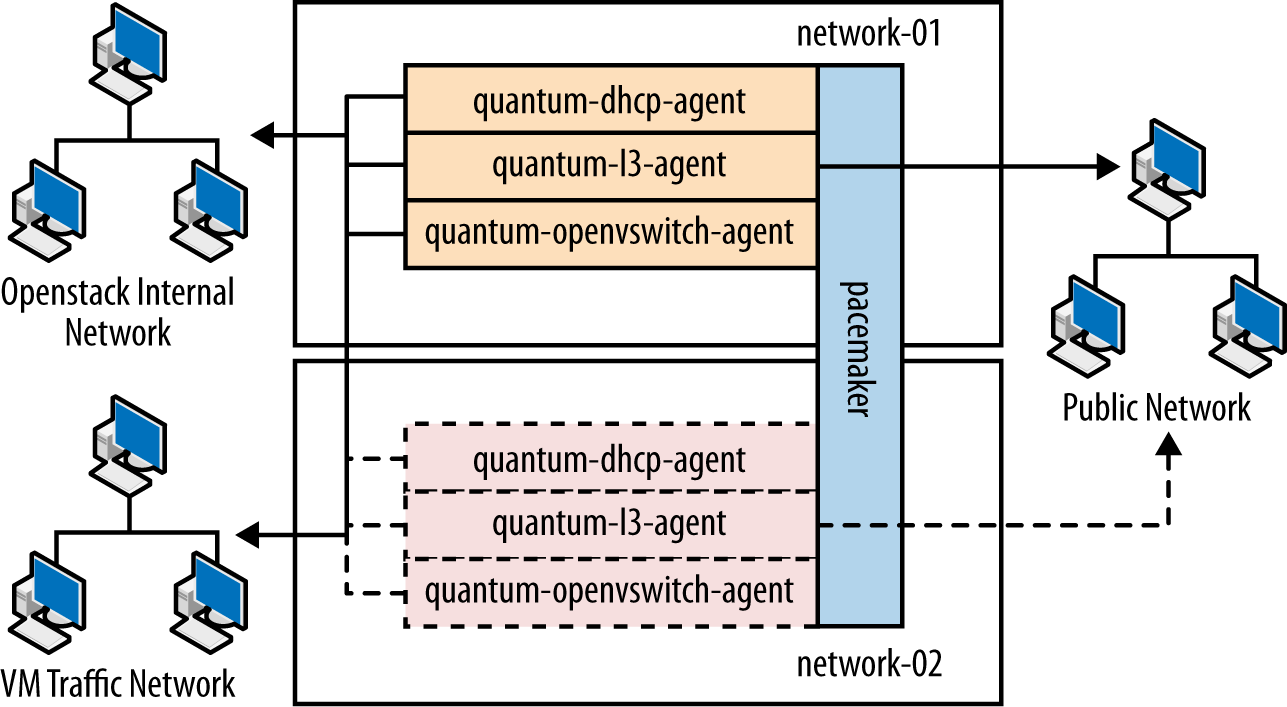
Example Hardware
Model: Dell R720xd
CPU: 2 x Intel® Xeon® CPU E5-2620 0 @ 2.00 GHz
Memory: 64 GB
Disk: 2 x 500 GB 7200 RPM SAS Disks + 24 x 600 GB 10000 RPM SAS Disks
Raid Controller: PERC H710P Integrated RAID Controller, 1 GB NV Cache
Network: 2 x 10G network ports
Network Node
Network nodes are responsible for doing all the virtual networking needed for people to create public or private networks and uplink their virtual machines into external networks. Network nodes:
- • Form the only ingress and egress point for instances running on top of OpenStack.
- • Run all of the environment's networking services, with the exception of the networking API service (which runs on the controller node).
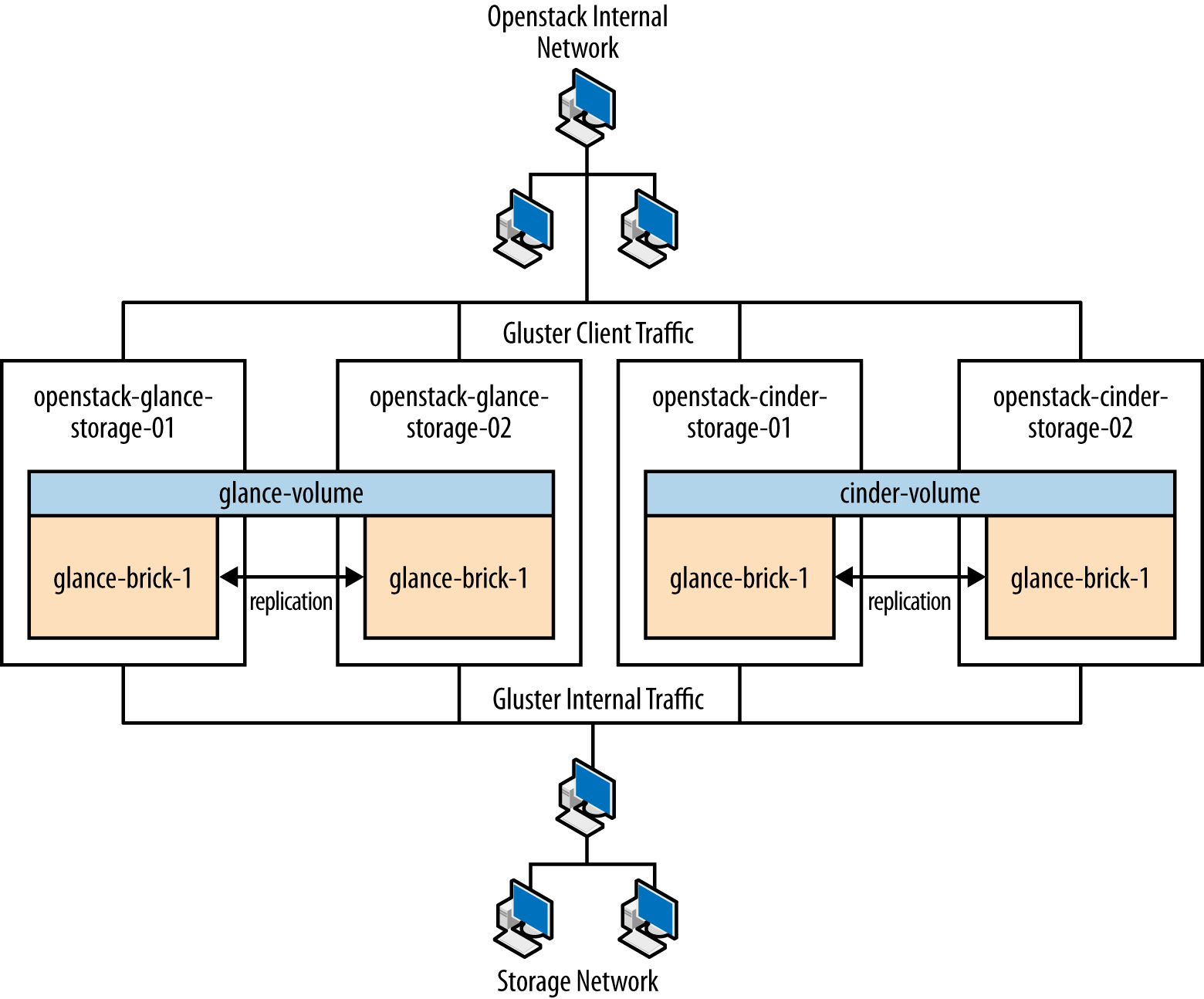
Example Hardware
Model: Dell R620
CPU: 1 x Intel® Xeon® CPU E5-2620 0 @ 2.00 GHz
Memory: 32 GB
Disk: 2 x 300 GB 10000 RPM SAS Disks
Network: 5 x 10G network ports
Utility Node
Utility nodes are used by internal administration staff only to provide a number of basic system administration functions needed to get the environment up and running and to maintain the hardware, OS, and software on which it runs.
These nodes run services such as provisioning, configuration management, monitoring, or GlusterFS management software. They are not required to scale, although these machines are usually backed up.
Example Hardware
Model: Dell R620
CPU: 2x Intel® Xeon® CPU E5-2620 0 @ 2.00 GHz
Memory: 32 GB
Disk: 2 x 500 GB 7200 RPM SAS Disks
Network: 2 x 10G network ports
Networking
The network contains all the management devices for all hardware in the environment (for example, by including Dell iDrac7 devices for the hardware nodes, and management interfaces for network switches). The network is accessed by internal staff only when diagnosing or recovering a hardware issue.
OpenStack Internal Network
This network is used for OpenStack management functions and traffic, including services needed for the provisioning of physical nodes (pxe, tftp, kickstart), traffic between various OpenStack node types using OpenStack APIs and messages, and all traffic for storage data to the storage layer underneath by the Gluster protocol. All physical nodes have at least one network interface (typically eth0) in this network. This network is only accessible from other VLANs on port 22 (for ssh access to manage machines).
Public Network
This network is a combination of:
- • IP addresses for public-facing interfaces on the controller nodes (which end users will access the OpenStack services)
- • A range of publicly routable, IPv4 network addresses to be used by OpenStack Networking for floating IPs
- • Routers for private networks created within OpenStack
This network is connected to the controller nodes so users can access the OpenStack interfaces, and connected to the network nodes to provide VMs with publicly routable traffic functionality. The network is also connected to the utility machines so that any utility services that need to be made public can be accessed.
VM Traffic Network
This is a closed network that is not publicly routable and is simply used as a private, internal network for traffic between virtual machines in OpenStack, and between the virtual machines and the network nodes that provide l3 routes out to the public network.
Deployment Models
Initial Deployment
Initially, the connection setup should revolve around keeping the connectivity simple and straightforward in order to minimize deployment complexity and time to deploy. The deployment shown in Figure 1.1 aims to have 1 x 10G connectivity available to all compute nodes, while still leveraging bonding on appropriate nodes for maximum performance.
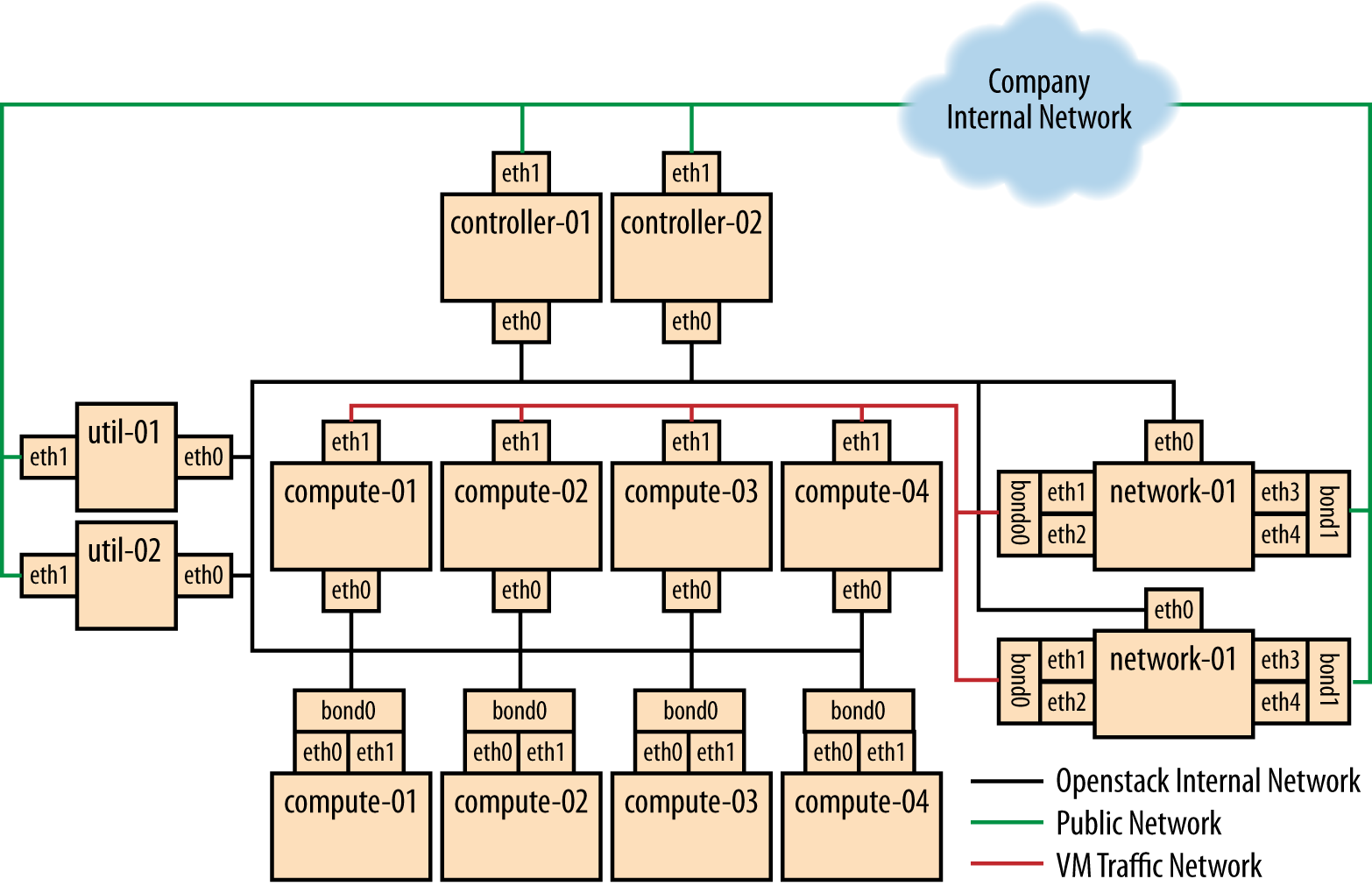
Connectivity for Maximum Performance
If the networking performance of the basic layout is not enough, you can move to Figure 1.2, which provides 2 x 10G network links to all instances in the environment as well as providing more network bandwidth to the storage layer.
Each deployment is validated automatically, ensuring performance and compliance benchmarks are met before production handoff.
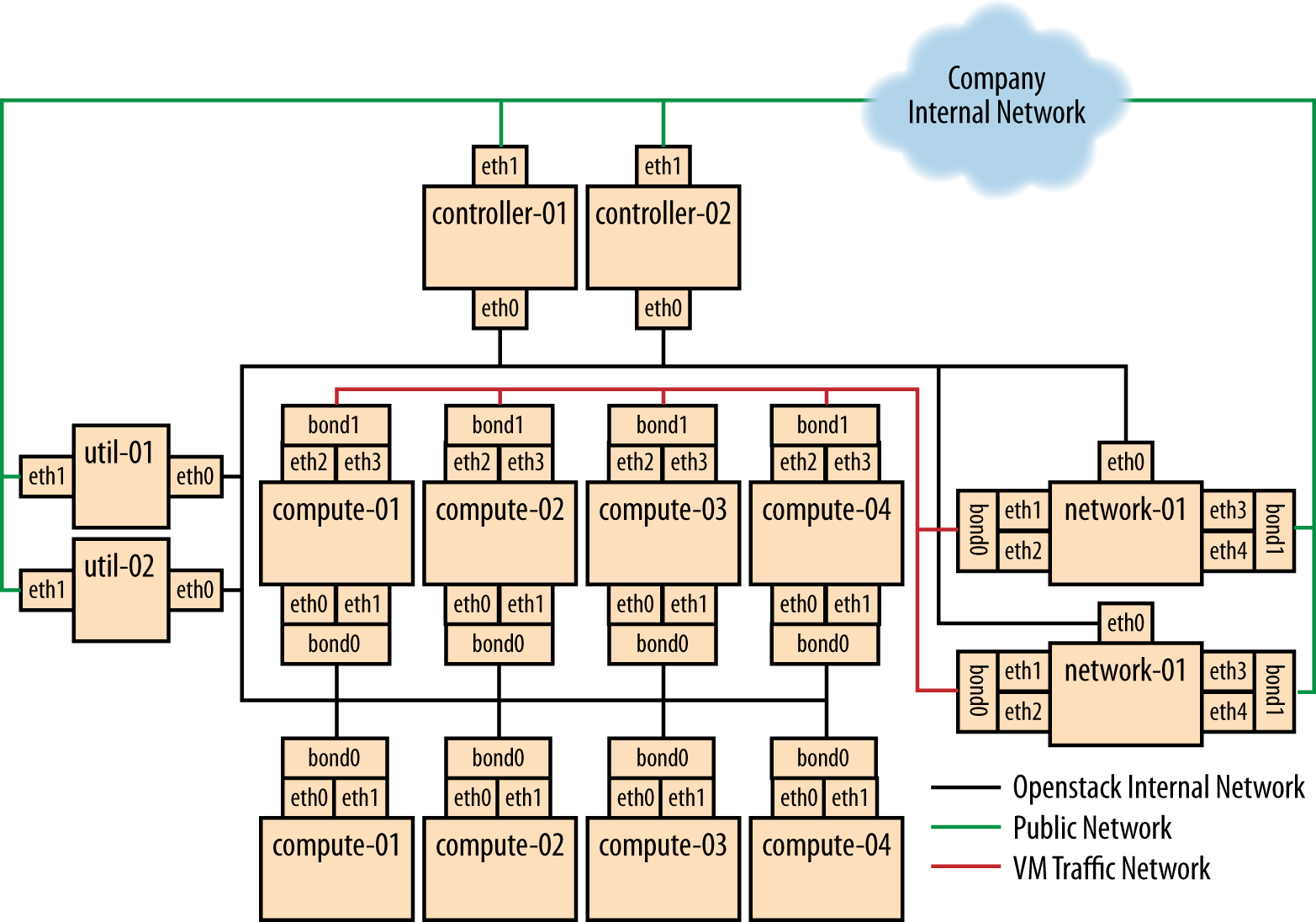
Getting Hands-On: Your First VM2Cloud OpenStack Lab
- 1. Access the VM2Cloud Dashboard and register your project.
- 2. Create your first tenant, assign user roles, and upload a base image.
- 3. Define compute flavors (vCPU, RAM, Disk) based on workload type.
- 4. Configure Neutron networks and floating IPs.
- 5. Launch your first instance from the dashboard — within minutes.
The entire process is visual, guided, and integrated into VM2Cloud's control plane, eliminating command-line complexity.
Automation and Lifecycle Management
VM2Cloud's automation layer extends beyond initial deployment. Through policy-driven orchestration, clients can:
- • Scale compute and storage dynamically.
- • Schedule automated backups and snapshots.
- • Integrate identity federation via Keycloak/OIDC.
- • Monitor real-time performance with Grafana dashboards.
- • Enforce compliance baselines automatically.
This reduces operational overhead while maximizing uptime and resource efficiency.
Why Choose VM2Cloud for OpenStack?
VM2Cloud's value lies in transforming traditional OpenStack complexity into a seamless enterprise solution:
- • Automated, no-code deployment of OpenStack clusters.
- • Built-in Ceph storage and high availability configurations.
- • Optimized for GPU, AI, and edge workloads.
- • Make-in-India sovereign architecture with complete transparency.
In short, VM2Cloud empowers enterprises to own their cloud — open, faster, and smarter.
Conclusion
OpenStack is the foundation of open cloud innovation. With VM2Cloud, businesses can deploy, scale, and manage private clouds without the steep learning curve. Whether you're modernizing IT infrastructure or building a sovereign data cloud, VM2Cloud provides a unified, secure, and performance-optimized OpenStack experience.